Key Takeaways
- Microsoft is developing features to integrate smartphone functions more deeply into Windows 11.
- Improved Phone Companion in Start menu and new flyout controls are part of the changes.
- Full clipboard history sync between smartphones and Windows 11 is under consideration.
Microsoft is reportedly exploring several enhancements to integrate smartphone functions more seamlessly into its latest operating system, Windows 11. According to sources familiar with the plans, the company aims to distribute more Phone Link features across the Windows interface, making it easier for users to access and control their mobile devices directly from the desktop.
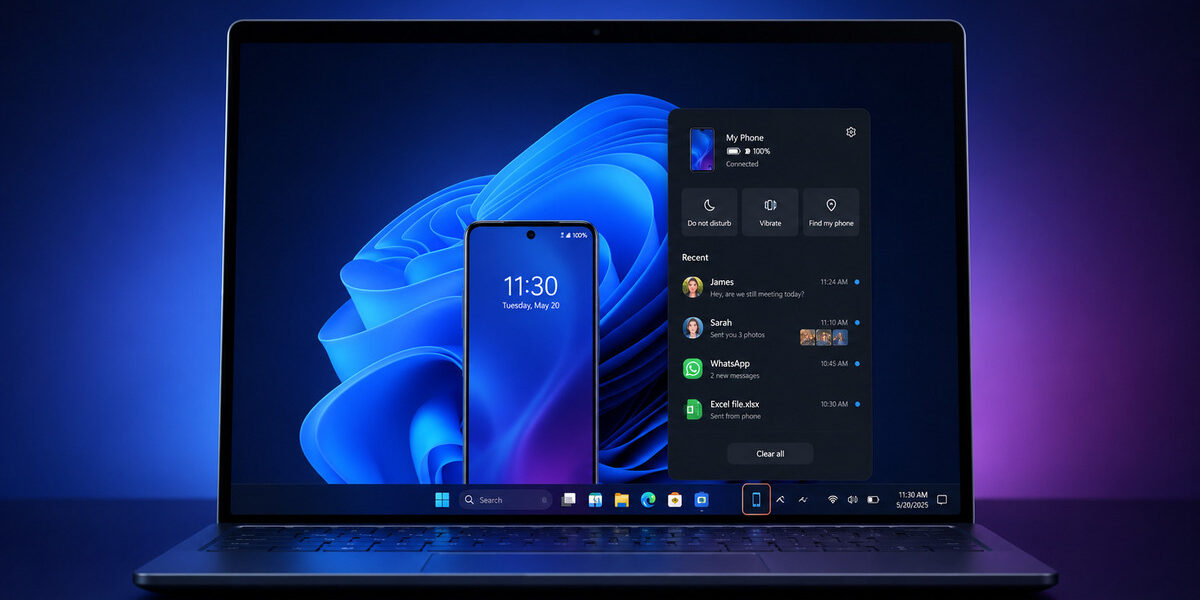
One of the key developments is an improved version of the Phone Companion feature in the Start menu. This updated panel can display recent phone activity, including messages, calls, photos, and app notifications, allowing users to scroll through these items without opening the standalone Phone Link application. Microsoft previously introduced this expanded layout to Windows Insiders through a Dev Channel build.
Additionally, a separate smartphone flyout is reportedly being tested for the Windows 11 system tray. A phone icon would appear whenever a smartphone is connected to the PC. Selecting it would open a panel showing information about the device and its current status. The proposed flyout could include controls for Do Not Disturb, vibration mode, and Find My Phone. Users may also be able to send files by dragging them onto the phone icon in the system tray.
Microsoft is also considering detailed previews when users hover over an activity on the Start menu panel or the system tray flyout. This feature could allow users to view a complete message or larger photo directly from these interfaces, enhancing user convenience and interaction with their connected devices.
Another development under consideration is full clipboard history sync between smartphones and Windows 11. While Phone Link can already sync copied content between supported phones and PCs, the current experience generally focuses on the most recently copied item. The proposed feature would integrate phone content with Windows 11’s existing clipboard history, giving users access to a list of previously copied text and other supported items across both devices.
A dedicated Messages app for Windows 11 is also in development. This standalone application would synchronise SMS conversations from a connected phone and allow users to read messages, respond to existing conversations, and start new chats with their contacts. Phone Link already provides messaging functionality, but the proposed version would operate as a separate Windows application that users could launch or pin through the Start menu.
These changes form part of Microsoft’s broader effort to make smartphone functions feel like native parts of Windows 11. Traditionally, Phone Link provided messages, calls, notifications, and photos through a standalone application. However, Microsoft has gradually started moving connected-phone features into other areas of the operating system. Windows 11 already allows users to manage supported mobile devices through Settings, use a phone as a connected camera, and access phone files through File Explorer.
While these developments are still in the prototype stage and may not be released in their current form, they represent a significant step towards making smartphone integration more intuitive and user-friendly within Windows 11.